概要
AntigravityのChatで指示するとアプリで利用するアイコンを生成できる。
生成したアイコンのリサイズやワークスペース上への配置もChatから指示すれば可能。
はじめに
AntigravityはNano Bananaが使える。(しかも無料)
そのためワークスペース上のコードを基にアプリアイコンを生成できるのでは?と思い試してみた。
試した内容
現在、スーパードラッグ付きのマウスジェスチャをChrome拡張機能で開発しているため、このアプリのアイコンを生成させてみた。
画像生成
AntigravityのChatを開き、画像生成を指示する。(使用モデルはGemini 3 Pro)
アイコンに対する要件は特になかったので、プロンプトは以下のようにシンプルなものにした。
このワークスペースの処理内容を基に最適なアイコン画像を生成して
するとワークスペースに置いてあるドキュメントやpackage.jsonの内容を読み込んでアイコンを生成してくれた。

画像生成後の回答↓

リサイズ
Chrome拡張機能用に画像のリサイズとワークスペースへの配置も行ってくれるらしいので試してみた。
このアイコンを採用します。リサイズと配置をお願いします。
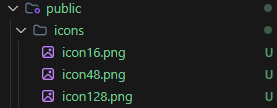
すると専用のスクリプトを生成して、それを叩く形で実行された。


生成されたスクリプト
Add-Type -AssemblyName System.Drawing

$sourcePath = "<生成された画像ファイルのパス>"
$destDir = "<リサイズ後の配置先>"

# Ensure destination directory exists
if (!(Test-Path -Path $destDir)) {
    New-Item -ItemType Directory -Path $destDir | Out-Null
}

function Resize-And-Save {
    param (
        [string]$InputPath,
        [string]$OutputPath,
        [int]$Width,
        [int]$Height
    )

    try {
        $image = [System.Drawing.Image]::FromFile($InputPath)
        $bitmap = New-Object System.Drawing.Bitmap($Width, $Height)
        $graphics = [System.Drawing.Graphics]::FromImage($bitmap)

        $graphics.SmoothingMode = [System.Drawing.Drawing2D.SmoothingMode]::HighQuality
        $graphics.InterpolationMode = [System.Drawing.Drawing2D.InterpolationMode]::HighQualityBicubic
        $graphics.PixelOffsetMode = [System.Drawing.Drawing2D.PixelOffsetMode]::HighQuality

        $graphics.DrawImage($image, 0, 0, $Width, $Height)

        $bitmap.Save($OutputPath, [System.Drawing.Imaging.ImageFormat]::Png)

        Write-Host "Created $OutputPath"
    }
    catch {
        Write-Error "Failed to resize image: $_"
    }
    finally {
        if ($graphics) { $graphics.Dispose() }
        if ($bitmap) { $bitmap.Dispose() }
        if ($image) { $image.Dispose() }
    }
}

Resize-And-Save -InputPath $sourcePath -OutputPath "$destDir\icon16.png" -Width 16 -Height 16
Resize-And-Save -InputPath $sourcePath -OutputPath "$destDir\icon48.png" -Width 48 -Height 48
Resize-And-Save -InputPath $sourcePath -OutputPath "$destDir\icon128.png" -Width 128 -Height 128
スクリプトも1発で動いて、ちゃんとファイル出力されていた。
さいごに
個人的にはChrome拡張機能作る上で一番面倒だったのがアイコンの作成なので、これをAIに任せられるようになってめっちゃ楽になった。
これが無料で使えるのはありがたい。